Bookings at your fingertips with the app
Download the RB app, collect coins and enjoy exclusive benefits.
FAQ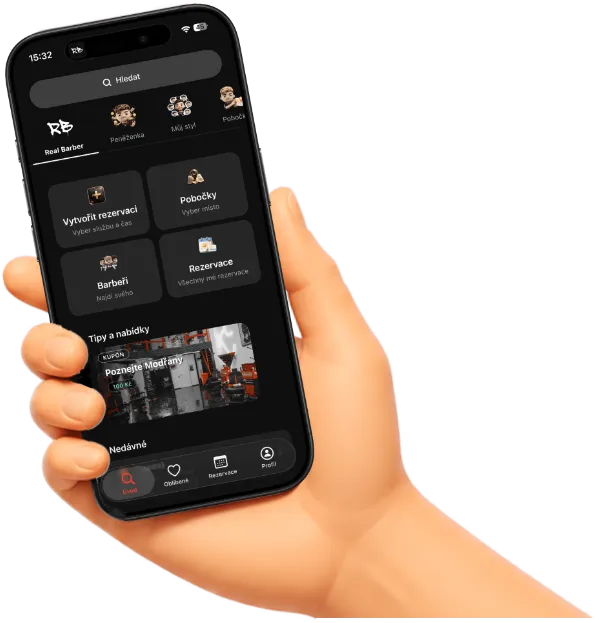



FAQ — Join the app
What is the Real Barber app and who is it for?
The official mobile app for Real Barber clients in Prague. It lets you book haircuts and other services, manage visits, stay in touch with branches, and use loyalty benefits (RB coins, coupons, referrals). It is designed for customers who want appointments, visit history, and perks in one place, without calling reception or sending messages.
Is the app free? Do I need an account?
Downloading and using the app is free. To create a booking, use the RBC wallet, save favorites, leave reviews, or join a waitlist, you need a free account. Registration uses your phone number and SMS verification. It usually takes just a few seconds.
How do I register or sign in?
Enter your phone number and we will send you a 6-digit SMS code (valid for about 10 minutes). If you already have a profile with us, you are signed in right after verification. New clients go through a short setup: name, email, and optionally date of birth and a profile photo. You can also sign in with phone and password if you have one set up.
How do I book an appointment in the app?
Choose Create booking in the menu and follow a few steps: branch, service, barber (or “anyone available”), date and time, review your details, and confirm. If you are signed in with a complete profile, your details are prefilled. You can also pick an open slot directly from Today’s availability or from a barber’s profile with one tap.
What if I need to change or cancel my appointment?
In the Bookings tab you see upcoming and past visits. For an active booking you can reschedule (change date and time while keeping the same service and barber) or cancel with an optional reason. After booking, the app can add the appointment to your phone calendar so you do not miss it.
What does “Near me” on the home screen mean?
The feature uses your phone location to show the nearest Real Barber branch: distance, estimated travel time by car, and the nearest available slots at that branch. From there you can open navigation (Google Maps or Waze) or continue straight to booking. Branches are in Prague: Modřany, Kačerov, Hagibor, and Barrandov.
What are RB coins and what is the wallet for?
RB coins (RBC) are Real Barber loyalty credits. In the Wallet you see your balance, transaction history (cashback, transfers, payments), and you can send RBC to another client or colleague, for example as a thank-you. RB coins can also be used as a payment method when booking or sent to your barber as a tip from the visit detail screen.
How do discount coupons and promotions work in the app?
On the home screen you will find a Tips & offers carousel with promo banners and coupons. Each coupon shows the code, validity period, and where it applies. When booking, you can enter a discount code or gift voucher and see the updated price immediately. An applied coupon also appears in the detail of that booking.
What if my barber has no available slots?
For a fully booked barber you can use the waitlist. After signing in, you join with one tap (using the phone number from your profile) and the team will contact you if a slot opens up. You will see the “you are on the waitlist” status in the app for that barber and day.
How do push notifications work?
After you allow notifications on your phone, the app informs you about important events: booking status, reminders before your visit, review prompts, or RBC wallet activity. Tapping a notification takes you straight to the booking detail, review screen, or transaction. In settings you can adjust communication preferences (push, email, SMS, WhatsApp, and content types: news, favorites, reviews).
Where can I download the app?
You can find the Real Barber app in the App Store (iPhone) and Google Play (Android). On the web you can use the download page with a QR code. The link realbarber.cz/aplikace/stahnout directs you to the right store for your device. After installing, register with your phone and you can book right away.
Can I save favorite branches, barbers, or services?
Yes. Tap the heart on a branch, barber, service, product, or guide and it is saved under Favorites. You can return to them quickly without searching the catalog. Favorite barbers also appear in the team overview under Today’s available favorites.
How does the referral program work?
In the wallet or referral section you will see active referral programs: how much RBC you and your friend receive, terms, and validity. The app generates your referral code and a link to share. You can track how many people you invited and what rewards you earned.
What is “My style” and what is it for?
The My style section is your personal haircut archive: photos, notes, and information about individual visits. At your next booking, you and your barber know what worked last time. It is useful if you visit regularly or want all your cuts in one place.
What is coming next and why join now?
The app keeps growing: new promotions, improved notifications, client profile features (including perks for completed details), and tighter integration with all branches. By joining now you immediately get fast booking without phone calls, a clear view of your appointments, RB coins and cashback, coupons, a waitlist for favorite barbers, and the ability to leave reviews. The account is free and registration takes just a few seconds. All you need is your phone and an SMS code.
For more information
If you have any general questions about the app, loyalty points (RB coins) and how to redeem them, do not hesitate to contact us.
Email us or call — we will get back to you as soon as we can.
We are ready for your questions!